Shading 3D with School Math (and ThorVG) — Part 2
Last time the space station rendered as one flat white shape. This time I give it a light and shade every face, and on the way there the cross product and the dot product finally made sense to me. Still nothing but school math, still ThorVG doing the drawing.
Last time I projected a space station onto a 2D canvas and let ThorVG fill the faces. It worked, but every face got the same white, so the station rendered as one solid white shape that only looks 3D because it rotates. This time I want to give it life: add a light and shade every face by how much light falls on it.
Same rules as last time. I’m allowed to make any assumption that deletes math, because this is for learning, not for shipping. And while doing it I finally understood what the dot product and the cross product are for. I memorized both formulas at school, passed the exams, and never once knew why anyone would want them. Turns out I needed a spinning space station.
Where the light comes from
Two assumptions before anything else.
First, the light is directional. The rays don’t spread out from a bulb, they all travel in one direction, like sunlight. No falloff, no distance, just a direction.
Second, the light sits at the camera. The camera lives at the origin of our world and looks toward positive z, so the light travels the same way:
const light = { x: 0, y: 0, z: 1 };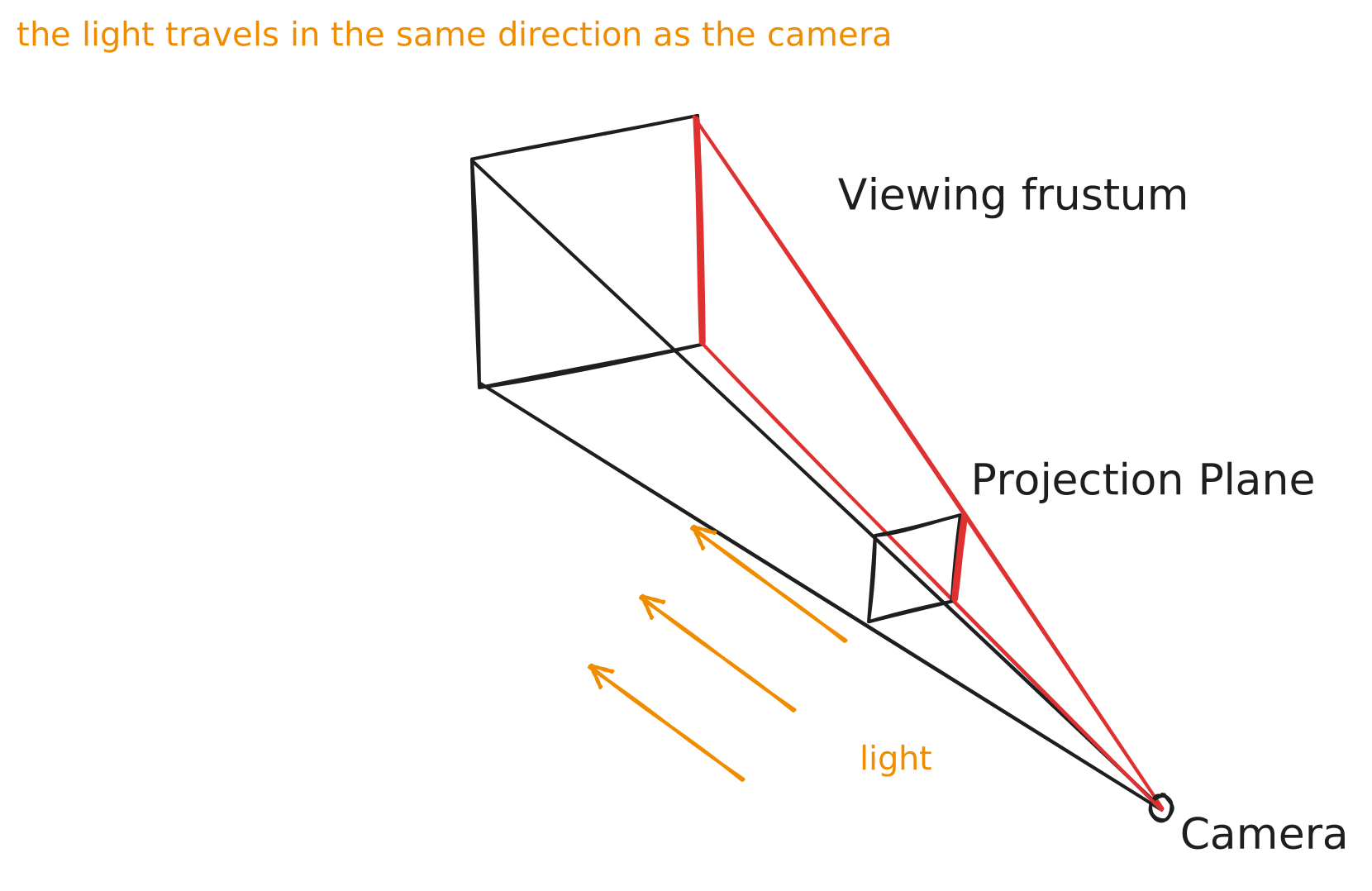
That second assumption is doing a lot of quiet work. If the light comes from the camera, then a face the camera can see is exactly a face the light hits. Keep that in your pocket, it pays off at the end of this post.
Now, what are we trying to do for each face?
- figure out which way the face is pointing in 3D — we care about direction, not size
- measure how much that direction lines up with the light
- turn that measurement into a shade: facing the light head-on means bright, barely facing it means dim
Two vector operations, one per step. Let’s go.
Which way is a face pointing
A face in our model is a triangle, three points. Take the vector from p1 to p2 and call it A, and the vector from p1 to p3 and call it B. The cross product A × B gives you a third vector that is perpendicular to both, which means perpendicular to the whole triangle. That’s the face’s direction. It has a proper name: the normal.
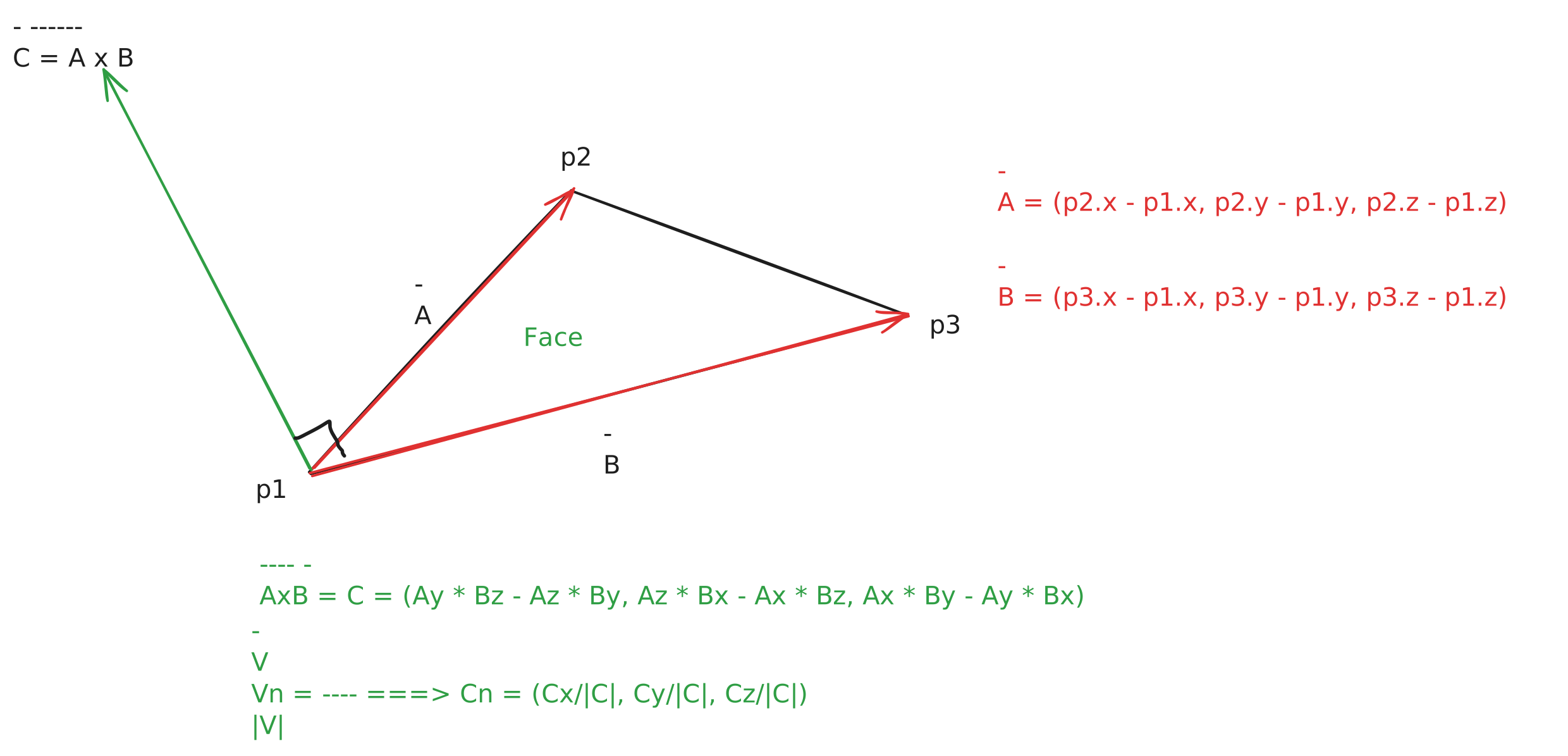
This was my first aha moment. I learned the cross product formula at school as a thing you compute and forget. Nobody told me “this is how you know which way a triangle is facing.” Super annoying. I think I’ll teach that to my kids before they finish primary school, because simple concepts stick when you have one cool example of where they’re useful.
// vector from p1 to p2
function vec3(p1, p2) {
    return {
        x: p2.x - p1.x,
        y: p2.y - p1.y,
        z: p2.z - p1.z,
    };
}

function cross(a, b) {
    return {
        x: a.y * b.z - a.z * b.y,
        y: a.z * b.x - a.x * b.z,
        z: a.x * b.y - a.y * b.x,
    };
}
One more step. The cross product’s length depends on the size of the triangle, and we don’t care about size, only direction. So we normalize it: divide the vector by its own length, and we get a vector pointing the same way but with length 1. A unit vector, a pure direction.
function normal({ x, y, z }) {
    const m = Math.sqrt(x * x + y * y + z * z);
    return {
        x: m ? x / m : 0,
        y: m ? y / m : 0,
        z: m ? z / m : 0,
    };
}
Our light is already a unit vector. Now every face has one too.
How much light hits the face
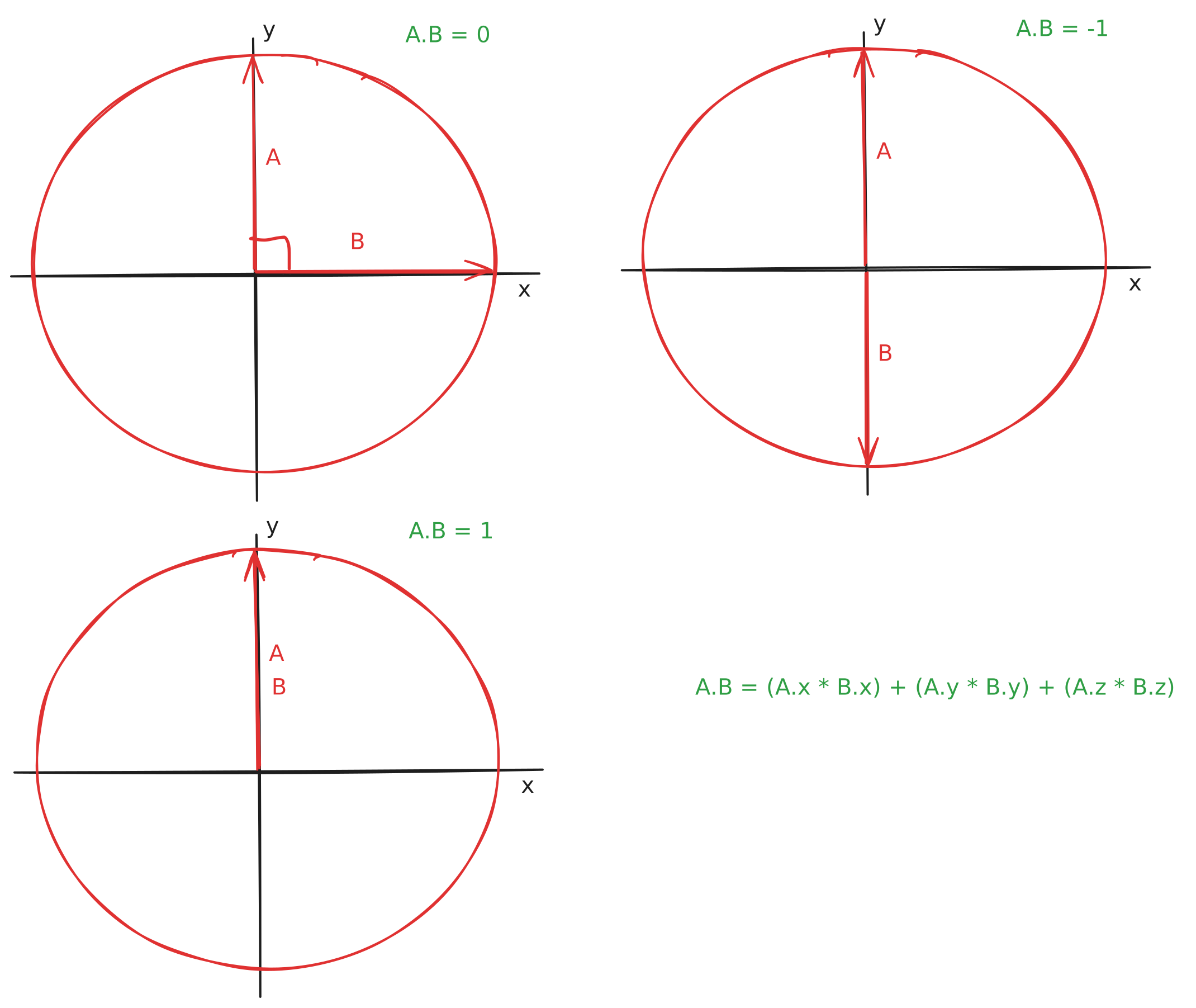
So we have two directions, the light and the face normal, and we want one number that says how much they line up. That’s literally what the dot product is, and this was my second aha moment.
The dot product of two vectors is |A||B|cos(angle), and since both of ours have length 1, it’s just cos(angle) between them. Plain school trigonometry doing all the work again: cos(0°) is 1, the two directions agree completely. cos(90°) is 0, they’re perpendicular, no cooperation at all. cos(180°) is -1, they point against each other.
And computing it is embarrassingly small:
function dot(a, b) {
    return a.x * b.x + a.y * b.y + a.z * b.z;
}
So the light intensity of a face is one dot product, a number between -1 and 1:
const intensity = dot(light, faceNormal);Intensity near 1 means the face meets the light head-on, so it should be bright. Near 0 means the light barely grazes it, so it should be dim. Below 0 means the face looks away from the light completely — with the light at the camera, that’s a face we’re seeing the back of.
And this trick turned out to be much older than I thought. It has a name, Lambert’s cosine law, and it’s from the 1760s. The lighting math inside every game engine is older than electricity.
One honest note here. Which sign means “facing the camera” depends on the order you take the triangle’s corners in, because cross(A, B) points exactly opposite of cross(B, A). OBJ files list the corners of every face in a consistent order, so the whole model agrees with itself. With my model and my A × B, the faces looking at the camera came out positive. If your model comes out inverted, swap A and B in the cross product and move on with your life.
Time to plug it into the pipeline from last time. For every frame we rotate and push the vertices like before, but now we also compute an intensity per face, and the fill color is just that intensity scaled to 0–255 on all three channels:
const processed = vertices.map((v) => translateZ(rotateXYZ(v, angle), 15));

const shadedFaces = faces.map(([i1, i2, i3]) => {
    const p1 = processed[i1];
    const p2 = processed[i2];
    const p3 = processed[i3];

    const faceNormal = normal(cross(vec3(p1, p2), vec3(p1, p3)));
    const intensity = dot(light, faceNormal);

    return [i1, i2, i3, intensity];
});

// and when drawing each face:
const shade = Math.max(0, Math.floor(intensity * 255));
face.fill(shade, shade, shade, 255);Hmm. Some faces are clearly darker than others now, the shading math works. But the whole thing looks off, like the station is showing us its bones. Faces that should be hidden keep bleeding through. (Ignore the button for a minute, it’s the fix.)
Draw the far faces first
The bug is not in the shading, it’s in the order. We draw faces in whatever order the OBJ file listed them, so a face at the back can easily get drawn after a face at the front and land on top of it. Before shading, every face was the same white, so the wrong order was invisible. The moment faces got different colors, the lie showed up.
The fix is old and has a lovely name: the painter’s algorithm. Paint the scene like a painter would, background first, then closer things on top. Our camera looks toward positive z, so bigger z means farther away. Give every face a depth, the average z of its three points, sort descending, draw the farthest first:
function depth(p1, p2, p3) {
    return (p1.z + p2.z + p3.z) / 3;
}

// inside the faces.map() from before, carry the depth along:
return [i1, i2, i3, intensity, depth(p1, p2, p3)];

// then sort: farthest faces first, so closer ones paint over them
shadedFaces.sort((a, b) => b[4] - a[4]);
Now press that button under the demo above and watch the station snap into a solid object. That’s the moment this clicked for me: the shading was never broken, the order was.
One thing to note: sorting by the average z doesn’t guarantee the right result, two overlapping faces can still sort the wrong way in nasty cases. The proper fix is a z-buffer, where you keep the depth per pixel instead of per face. That’s not how I want to spend this weekend, so painter’s algorithm it is. Z-buffering some other day.
Skip the faces we can’t see
Now think about the completely dark faces, the ones with intensity below zero. Do we need to draw them at all? They’re the backside of the station, and the front of the station is drawn on top of them anyway. That’s roughly half of all the faces, created, sorted, and filled every frame for nothing.
Remember the thing in your pocket from the beginning? Because the light sits at the camera, “face in the dark” and “face the camera can’t see” are the same set of faces. So one filter does the lighting cleanup and the classic optimization called backface culling:
const visibleFaces = shadedFaces.filter((face) => {
    const intensity = face[3];
    return intensity > 0;
});
ThorVG now gets about half the shapes per frame. The picture doesn’t change, the work does. The demo below has a counter and a button so you can see it for yourself:
loading…
One last tweak
The shading still felt too harsh to me. A face that’s almost edge-on to the light got a shade near zero, basically black, and the station’s dark side looked like a hole in the canvas. So instead of scaling the intensity to 0–255, I start at 50 and scale up to 250:
const shade = 50 + Math.floor(intensity * 200);A barely lit face is now dim instead of gone. I’m not sure if there’s a smarter way to do this, but it looked good enough to me, and “looked good enough” is the only spec this project has. That’s what the final demo above is running.
By the way, this whole technique, one intensity per face, has a name: flat shading. It’s the oldest and simplest shading there is, and you can tell, the faces are visible as flat plates of color. There are smoother techniques where the shading blends across faces, but flat shading is exactly the right amount of technique for a weekend, and honestly the faceted look has its own charm.
An honest ending
Counting what actually changed since last post: one light vector, four small vector functions, a sort, and a filter. That’s the whole diff, and the station went from a white paper cutout to something that reads as a solid object with a lit side and a dark side. Highest return for the least work, which is the only strategy I have in this series.
The real payoff for me is that cross and dot products are no longer formulas I memorized, they’re tools I’ve used. Cross product: which way does this face point. Dot product: how much do these two directions agree. I wish someone had said those two sentences to me fifteen years ago.
The to-do list keeps growing though: moving the camera around (the math looks easy, making sense of it will take me time), smooth shading, keeping the ThorVG shapes alive instead of recreating ten thousand of them every frame, z-buffering, view frustum culling. I won’t do all of that, and definitely not at once, I don’t want to confuse myself. Will keep posting anyway.
(Like last time, the demos are capped at 30fps and pause when they’re off screen, so your battery doesn’t pay for my hobby. And if your system asks for reduced motion, the station holds still instead of spinning.)
The first post was the first payment on a promise to learn in public. Consider this the second.
The whole thing in one file, if you want to play with it
<html>
    <body>
        <canvas id="canvas" style="background: black"></canvas>
        <script src="https://unpkg.com/@thorvg/[email protected]/dist/webcanvas.js"></script>
        <script src="https://unpkg.com/[email protected]/dist/OBJFile.js"></script>
        <script type="module">
            const WIDTH = 600;
            const HEIGHT = 600;
            const light = { x: 0, y: 0, z: 1 };

            const raw = await fetch(
                "https://theashraf.com/blog/3d/space_station.obj",
            ).then((res) => res.text());

            const model = new OBJFile(raw).parse().models[0];
            const vertices = model.vertices;
            const faces = model.faces.map(
                (face) => face.vertices.map((v) => v.vertexIndex - 1), // OBJ counts from 1
            );

            function project(point3d) {
                return {
                    x: point3d.x / point3d.z,
                    y: point3d.y / point3d.z,
                };
            }

            function toCanvas(point2d) {
                return {
                    x: (point2d.x + 1) * (WIDTH / 2),
                    y: (1 - point2d.y) * (HEIGHT / 2),
                };
            }

            function translateZ(point3d, dz) {
                point3d.z += dz;
                return point3d;
            }

            function rotateXYZ(point3d, angle) {
                const sin = Math.sin(angle);
                const cos = Math.cos(angle);

                let x1 = point3d.x;
                let y1 = point3d.y * cos - point3d.z * sin;
                let z1 = point3d.y * sin + point3d.z * cos;

                let x2 = x1 * cos + z1 * sin;
                let y2 = y1;
                let z2 = z1 * cos - x1 * sin;

                return {
                    x: x2 * cos - y2 * sin,
                    y: x2 * sin + y2 * cos,
                    z: z2,
                };
            }

            function vec3(p1, p2) {
                return {
                    x: p2.x - p1.x,
                    y: p2.y - p1.y,
                    z: p2.z - p1.z,
                };
            }

            function normal({ x, y, z }) {
                const m = Math.sqrt(x * x + y * y + z * z);
                return {
                    x: m ? x / m : 0,
                    y: m ? y / m : 0,
                    z: m ? z / m : 0,
                };
            }

            function dot(a, b) {
                return a.x * b.x + a.y * b.y + a.z * b.z;
            }

            function cross(a, b) {
                return {
                    x: a.y * b.z - a.z * b.y,
                    y: a.z * b.x - a.x * b.z,
                    z: a.x * b.y - a.y * b.x,
                };
            }

            function depth(p1, p2, p3) {
                return (p1.z + p2.z + p3.z) / 3;
            }

            const htmlCanvas = document.querySelector("#canvas");
            htmlCanvas.width = WIDTH;
            htmlCanvas.height = HEIGHT;

            const TVG = await ThorVG.init({
                renderer: "gl",
                locateFile: (file) =>
                    `https://unpkg.com/@thorvg/[email protected]/dist/${file}`,
            });

            const canvas = new TVG.Canvas("#canvas", {
                width: WIDTH,
                height: HEIGHT,
            });

            function drawFace(p1, p2, p3, shade) {
                const face = new TVG.Shape();
                face.moveTo(p1.x, p1.y);
                face.lineTo(p2.x, p2.y);
                face.lineTo(p3.x, p3.y);
                face.close();
                face.fill(shade, shade, shade, 255);
                canvas.add(face);
            }

            let angle = 0;
            function render() {
                angle += 0.01;
                canvas.remove();

                const processed = vertices.map((v) =>
                    translateZ(rotateXYZ(v, angle), 15),
                );

                const shadedFaces = faces
                    .map(([i1, i2, i3]) => {
                        const p1 = processed[i1];
                        const p2 = processed[i2];
                        const p3 = processed[i3];

                        const faceNormal = normal(
                            cross(vec3(p1, p2), vec3(p1, p3)),
                        );
                        const intensity = dot(light, faceNormal);
                        const d = depth(p1, p2, p3);

                        return [i1, i2, i3, intensity, d];
                    })
                    .filter((face) => face[3] > 0); // backface culling

                // painter's algorithm: farthest first
                shadedFaces.sort((a, b) => b[4] - a[4]);

                const points = processed.map((v) => toCanvas(project(v)));

                for (const [i1, i2, i3, intensity] of shadedFaces) {
                    const shade = 50 + Math.floor(intensity * 200);
                    drawFace(points[i1], points[i2], points[i3], shade);
                }

                canvas.update();
                canvas.render();
                requestAnimationFrame(render);
            }
            requestAnimationFrame(render);
        </script>
    </body>
</html>